How to Activate Commercial Bank of Ethiopia Internet Banking?
Last updated on April 24th, 2026 at 12:01 am
The procedure to activate the Commercial Bank of Ethiopia Internet Banking is simple. The Commercial Bank of Ethiopia (CBE) allows its customers to to transfer funds, ply utility bills and check account balance through internet banking. It is available to both personal and corporate users.
You must visit Commercial Bank of Ethiopia branch physically and apply for activation of internet banking. The bank will provide you with a security pocket token ( which is a device) and a user ID.
Once you receive security Pocket from the bank, you need to make first time registration. Open any web browser and type https://cbeib.cbe.com.et/ and click on the internet banking icon then login home page will display. To start first time registration click “New customer”. You will find Registration Menu. Click on “I agree” for Term and conditions of Internet Banking. The Registration menu will display with the user authentication information boxes. Please enter USER ID, DEVICE SERIAL NUMBER, A MEMORABLE WORD and create your online banking password and click Register. You will get a message “You are successfully registered.”
How to Use Pocket Token Provided by CBE:
A pocket token is a device that is used to prove one’s identity electronically (as in the case of a customer trying to access their bank account).The token is used in addition to or in place of a password to prove that the customer is who they claim to be.
How to Generate One Time Password (OTP):
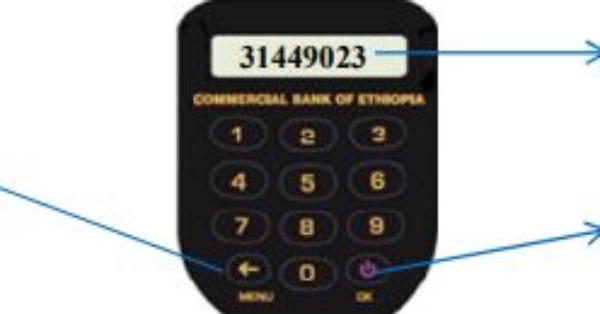
Turn on the your Security Token Device (press power button) , it request you to enter PIN (four digit number). If you are using your token for the first time, give the default PIN 1254, and press ‘OK’ from the keypad ( ), the token generate an OTP (eight digit number) and shown to you on the screen. Then you can use this OTP to login to the Internet Banking https://cbeib.cbe.com.et/login and process fund transfer or other activities.
If you do not want to carry a physical device, you have the option of downloading the “CBE Mobile Token” from the Google Play Store or Apple App Store.
How to Activate Awash Bank Internet Banking?
Hibret Bank Daily Exchange Rate





Good morning
ኡዳሳ
intrnet bankig
Mohammwg5
I was a user of Commercial Bank of Ethiopia’s internet banking and it was deleted.